
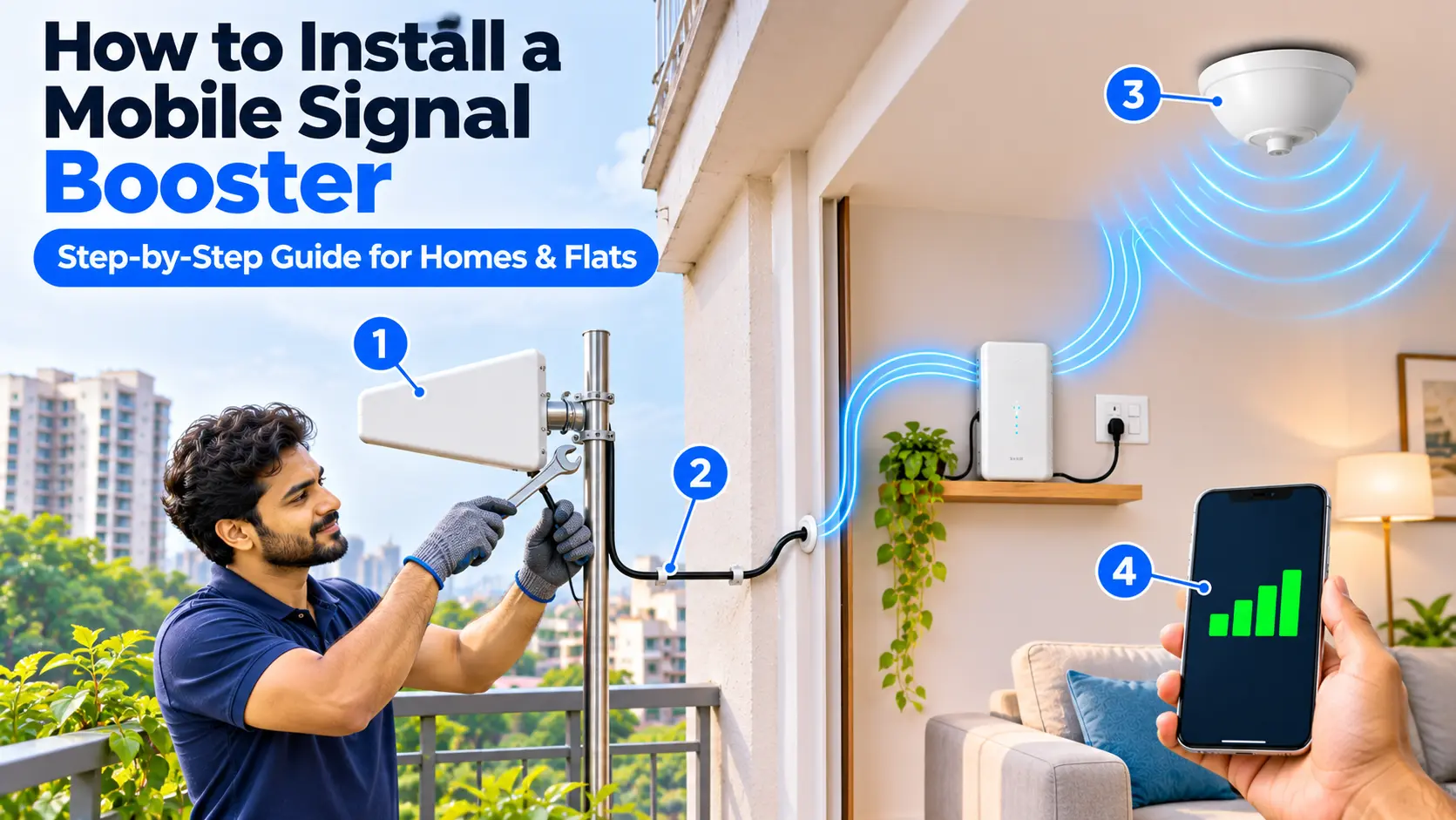
Weak mobile signal indoors is a common problem in houses, flats and offices. Concrete walls, tinted or coated glass, steel structures and distance from the nearest tower all block the outdoor signal before it reaches your rooms. The result is dropped calls, robotic voice quality and slow mobile data. A mobile signal booster fixes this by picking up the signal outside, amplifying it and sending it back out inside your home.
Installing one is not complicated, but where you put the antennas and how you run the cable decide how well it works. This guide covers the whole process: checking the outdoor signal, mounting the antennas, routing the cable, and powering on and fine-tuning the system. New to boosters? Start with what a mobile signal amplifier is and how it works.
DIY or Professional Installation: Which Suits Your Home?
Before you start, decide whether you can do the job yourself.
DIY installation works well for:
- Flats, single-floor homes, small houses and small offices.
- Homes where you can safely reach the roof, terrace, balcony or an outside wall.
- Simple cable routes that don’t need drilling through several walls or floors.
Professional installation is better for:
- Multi-storey houses, large offices, warehouses, hotels, hospitals and factories.
- Roofs that are unsafe to reach without proper safety equipment.
- Systems with several indoor antennas, splitters or long cable runs covering a large area.
For most flats and homes with a reachable balcony, window or terrace, a standard home kit can be installed in an afternoon with basic tools.
Tools and Equipment You Need
Collect everything before you start so you aren’t climbing up and down a ladder for missing parts.
- Signal booster kit: outdoor (donor) antenna, indoor (service) antenna, booster unit, power adapter and coaxial cables.
- Mounting hardware: mounting pole or pipe, wall bracket or clamp, U-bolts, screws and wall plugs.
- Hand tools: spanner, screwdriver set, drill with masonry bit, cable clips and cable ties.
- Safety gear: sturdy ladder, non-slip footwear and gloves. Ask someone to hold the ladder.
- Weatherproofing: outdoor silicone sealant and self-amalgamating or electrical tape for outdoor connectors.
- Signal reading: a smartphone that shows signal strength in dBm.
Step 1: Find the Best Spot for the Outdoor Antenna
A booster can only amplify the signal its outdoor antenna receives, so this step decides how well the whole system works. It cannot create signal where there is none.
Measure the outdoor signal in dBm
Signal bars differ from phone to phone, so measure the actual signal strength in dBm instead. Our guide on how to check mobile network strength on Android and iPhone shows where to find it. For 4G, readings are negative numbers, and closer to zero is better:
- -80 dBm or better: strong signal
- -80 to -95 dBm: good to fair
- -95 to -105 dBm: weak, calls may drop
- Worse than -110 dBm: very weak or unusable
Walk around your roof, terrace, balconies and windows, holding your phone still for a few seconds at each spot. The place with the best reading is where the outdoor antenna should go. In a flat, this is usually the balcony or window facing the nearest tower, or the building terrace if you have permission to use it.
Mount the outdoor antenna
- Directional antenna (Yagi or log-periodic): best when the signal is weak. Point it at the direction where you got the best reading, which is usually toward the nearest tower.
- Omnidirectional antenna: suits areas with fair signal from several directions. Mount it upright on a pole.
Fix the antenna firmly on a pole, wall bracket or balcony railing clamp, as high and as clear as possible. Keep it away from metal sheets, water tanks, thick walls and trees in the direction of the tower. If you live in a building or rented home, get permission from your landlord, building management or housing society before mounting anything on a shared terrace or outside wall.
Step 2: Route the Cable Indoors
Next, run the coaxial cable from the outdoor antenna to where the booster unit will sit.
- Keep it short: every extra metre of cable loses some signal. Take the shortest practical route and don’t coil up spare cable.
- No sharp bends: bend the cable in gentle curves. Sharp kinks damage the conductor inside.
- Fix it in place: clip the cable along walls or railings so wind doesn’t move it.
Bring the cable inside through a window gap, an existing pipe or AC opening, or a small hole drilled slightly upward from the outside. Just before the entry point, let the cable dip into a small downward loop (a drip loop) so rainwater drips off instead of running inside. Seal the hole with silicone and wrap outdoor connectors with tape. This matters even more if you get heavy rain.
Step 3: Place the Indoor Antenna and Booster
Keep the two antennas apart
If the indoor antenna’s signal reaches the outdoor antenna, the booster picks up its own output and creates a loop, much like a microphone squealing near a speaker. This is called oscillation. Most boosters protect themselves and the network by lowering their power or switching off, which leaves you with weak coverage.
- Keep the antennas as far apart as practical: aim for at least 6 to 10 metres between them.
- A solid wall, concrete floor slab or roof between the two antennas helps a lot. In a flat, put the outdoor antenna on the balcony and the indoor antenna in a room on the far side of the home.
- Never point the indoor antenna toward the outdoor antenna, and point the outdoor antenna away from your own windows.
Choose the indoor antenna position
- Ceiling dome antenna: mount it in the middle of the ceiling in the room or hall where you need signal most. It spreads signal in all directions.
- Wall panel antenna: mount it on a wall to push signal along a long room, corridor or office area, facing away from the outdoor antenna.
Set up the booster unit
Place the booster on a shelf or wall bracket near a power socket, somewhere dry and ventilated. Keep it out of direct sunlight and away from heaters and large metal objects. Connect the outdoor antenna cable to the port marked “Outdoor”, “Donor” or “BTS”, and the indoor antenna cable to the port marked “Indoor”, “Server” or “MS”. Hand-tighten the connectors firmly; don’t overtighten.
Step 4: Power On, Test and Fine-Tune
- Check that both antennas are connected before switching on. Powering a booster without antennas can damage it.
- Plug in the power adapter and switch on.
- Watch the indicator lights. Their meaning differs between models, so check your kit’s manual. On many boosters, green means normal, while amber or red means overload or oscillation.
If the lights show oscillation, switch off and increase the distance or add a wall between the antennas. If they show overload because the outdoor signal is very strong, turn the outdoor antenna slightly away from the tower or lower the gain if your booster has a gain control.
Now walk around and test. Make calls in the rooms that used to drop, and compare dBm readings with what you measured before. A well-installed system should improve indoor readings by a clear margin, often 15 to 30 dB. If some rooms are still weak, turn the outdoor antenna a little at a time, retesting after each change, until you find the best position.
Directional vs Omnidirectional Outdoor Antennas
| Feature | Directional (Yagi / Log-Periodic) | Omnidirectional |
|---|---|---|
| Best for | Weak to fair outdoor signal | Fair to good outdoor signal |
| Coverage angle | Focused beam (about 45° to 90°) | 360° all around |
| Needs aiming | Yes, toward the tower | No |
| Gain | Higher, reaches distant towers | Moderate |
| Typical use | Rural, suburban and low-signal areas | Cities with towers in several directions |
Common Installation Mistakes to Avoid
- Antennas too close together: causes oscillation, so the booster cuts its own power.
- Switching on without antennas: can damage the booster’s circuits.
- Too much cable: long or coiled cable wastes signal before it reaches the booster.
- Guessing the antenna direction: always aim using dBm readings, not guesswork.
- Wrong bands: a booster that doesn’t support your operator’s frequency bands will not help. Check the bands before you buy.
- Skipping weatherproofing: water in connectors or wall holes slowly ruins performance.
Still having problems after installing? See why your phone signal keeps dropping for other causes worth ruling out.
What a Booster Can and Can’t Do
- It needs outdoor signal: a booster amplifies existing signal. If there is no usable signal anywhere outside your home, it has nothing to work with.
- Data speed depends on the network too: a stronger signal means fewer drops and steadier data, but speed also depends on tower capacity, congestion and your phone.
- Band support matters: 4G and 5G use different frequencies. Our 4G vs 5G signal booster guide explains which you need, and the Jio, Airtel, Vi and BSNL frequency bands guide shows which bands each network uses.
- Small problems may not need one: if your signal is only slightly weak, try these ways to boost signal without a booster first.
Frequently Asked Questions
How long does it take to install a mobile signal booster?
A standard home kit usually takes 2 to 4 hours, including testing the signal and aiming the antenna. Larger homes or offices with several indoor antennas take longer.
Can I install a signal booster myself?
Yes. Most home kits are designed for DIY installation with basic tools. The key steps are finding the best outdoor signal spot, keeping the two antennas well apart and sealing the cable entry.
Can a booster create signal where there is none outside?
No. A booster captures existing outdoor signal, amplifies it and sends it indoors. If there is no usable signal outside your home, the booster has nothing to amplify.
How far apart should the indoor and outdoor antennas be?
Aim for at least 6 to 10 metres, ideally with a wall, floor slab or roof between them. If the booster still shows oscillation, increase the distance or turn the antennas away from each other.
Why is my booster’s light red or amber after installation?
On most models this means oscillation (the antennas are too close) or overload (the outdoor signal is too strong). Separate the antennas more, or turn the outdoor antenna slightly away from the tower. Check your kit’s manual for the exact meaning of each light.
Will a signal booster increase my mobile data speed?
It often helps, because a stronger signal means fewer errors and dropouts. But speed also depends on tower capacity, network congestion and your phone, so a booster cannot fix an overloaded tower.
Conclusion
Installing a mobile signal booster comes down to four things: a strong outdoor antenna spot, a short and well-sealed cable run, good separation between the antennas, and careful testing with dBm readings. Get those right and you can turn weak indoor signal into steady calls and data across your home.